
All Contractors must complete and submit a monthly return (CIS300) to HMRC regardless of whether or not you have actually made payments in the preceding month. This monthly return must contain details of all payments made to all subcontractors regardless of their tax treatment.
The monthly return runs from the 06th of month one to 05th of month two and must be filed with HMRC by the 19th of month two (or 22nd if payment is being made electronically).
For example:
For the tax month 06th April to 05th May the monthly return must be submitted by the 19th May. If no payments have been made a nil return must still be submitted by the required deadline.
NOTE - The CIS300 Monthly Return will ask whether you want to auto‑generate the submission once all payments for the Tax period (Monthly and weekly) have been finalised.”
Weekly and Monthly Payment Run
Payments can be processed on a tax weekly and/or tax monthly basis at the users discretion. While both payment runs operate independently of each other the records are merged for verification requests and monthly returns to HMRC.
Accessing the Monthly Return
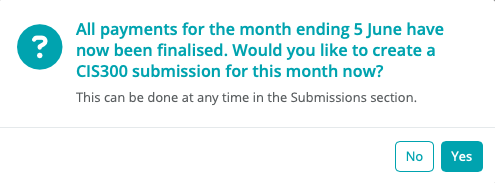
When all payments for the tax month have been finalised, BrightPay will offer to create a CIS300 monthly return for submitting to HMRC. The CIS300 informs HMRC of the payments made to subcontractors in the tax month.
To manually create the CIS300 Monthly Return
Simply select 'Submissions' on the menu toolbar.
1) Click 'New' on the menu toolbar and select 'CIS 300 Monthly Return'
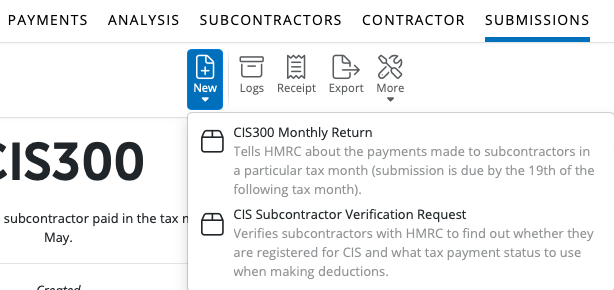
2) Select the appropriate tax month

Declarations:
There are three declarations to consider:
- Employment status has been considered for all subcontractors and contracts are not contracts of employment
- All subcontractors have been verified with HMRC or included in CIS returns in this or the previous 2 years
- The information given in this return is correct
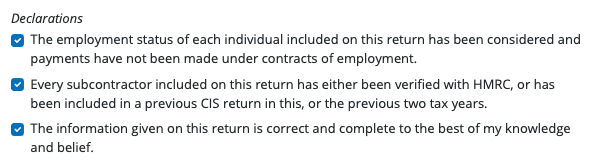
This is the sole responsibility of the contractor.
Inactivity
3) If you know you’re not going to make any payments to subcontractors for up to 6 months, you should include this indicator in the return.

4) Click 'OK', the contents of the monthly return will be displayed on screen. The Monthly Return can be printed, emailed or exported at any time before or after its submission to HMRC.
5) BrightPay will indicate if a monthly return has no subcontractor payments i.e. a Nil return. It is important to tell HMRC that you have not made any payments to subcontractors during the tax month, this is done by making a nil declaration.
6) When ready to submit the Monthly Return to HMRC, click 'Send Now'.

7) Confirmation details will subsequently appear on screen to indicate that your submission has been accepted by HMRC.

8) Should your submission fail, simply click on 'Details' for more information on why your submission has been rejected by HMRC and make amendments where required.
FAQs
Q. How can I resolve a CIS300 return that has been stuck as “waiting for a response from HMRC” for over 24 hours, and how can I delete or cancel it so I can resubmit?
A. If your CIS300 monthly return appears to be stuck sending, re‑sending, or you see a duplicate pending submission, follow these steps:
- Go to CIS module > Monthly Returns and check the Submission Status column.
- If a submission shows as Pending, Sending, or Waiting for response from HMRC for more than a few minutes, it may not have cleared successfully.
- Contact BrightCIS Support with your organisation name and contractor name so the stuck submission can be cleared manually.
- Once support confirms the submission has been cleared, you can submit a new CIS300 return if required.
Q. When will my submission appear on the HMRC agent portal?
A. After BrightCIS confirms a CIS300 submission as 'Submitted', it can take 24–72 hours for the return to appear on the HMRC online agent account. This delay is on HMRC's side and is normal. If the return does not appear on the HMRC portal after 3 working days, log into your HMRC agent account and check under CIS > Returns. If it is still missing, contact HMRC directly as BrightCIS has no visibility of HMRC's internal processing status once a submission is accepted.
Comments
0 comments
Article is closed for comments.